
Prompt improver
An agent works from what you wrote, not from what you meant. The prompt improver is the sparkle (✦) beside every field where you write for an agent: press it and your text comes back rewritten, streamed word by word with Accept and Discard underneath.
Two kinds of text live behind that one sparkle, and they need opposite treatment. A task — a Run instruction, a Schedule, a Loop goal — should come back as a goal with steps and a definition of done. A standing configuration file — your NOVA.md or NUCLEUS.md — should come back as the same preferences, better organized, and must never be turned into a work order. The improver picks the right one from the field you are in; you never choose.
Nothing is committed until you accept. Discard leaves your draft exactly as you typed it, character for character.
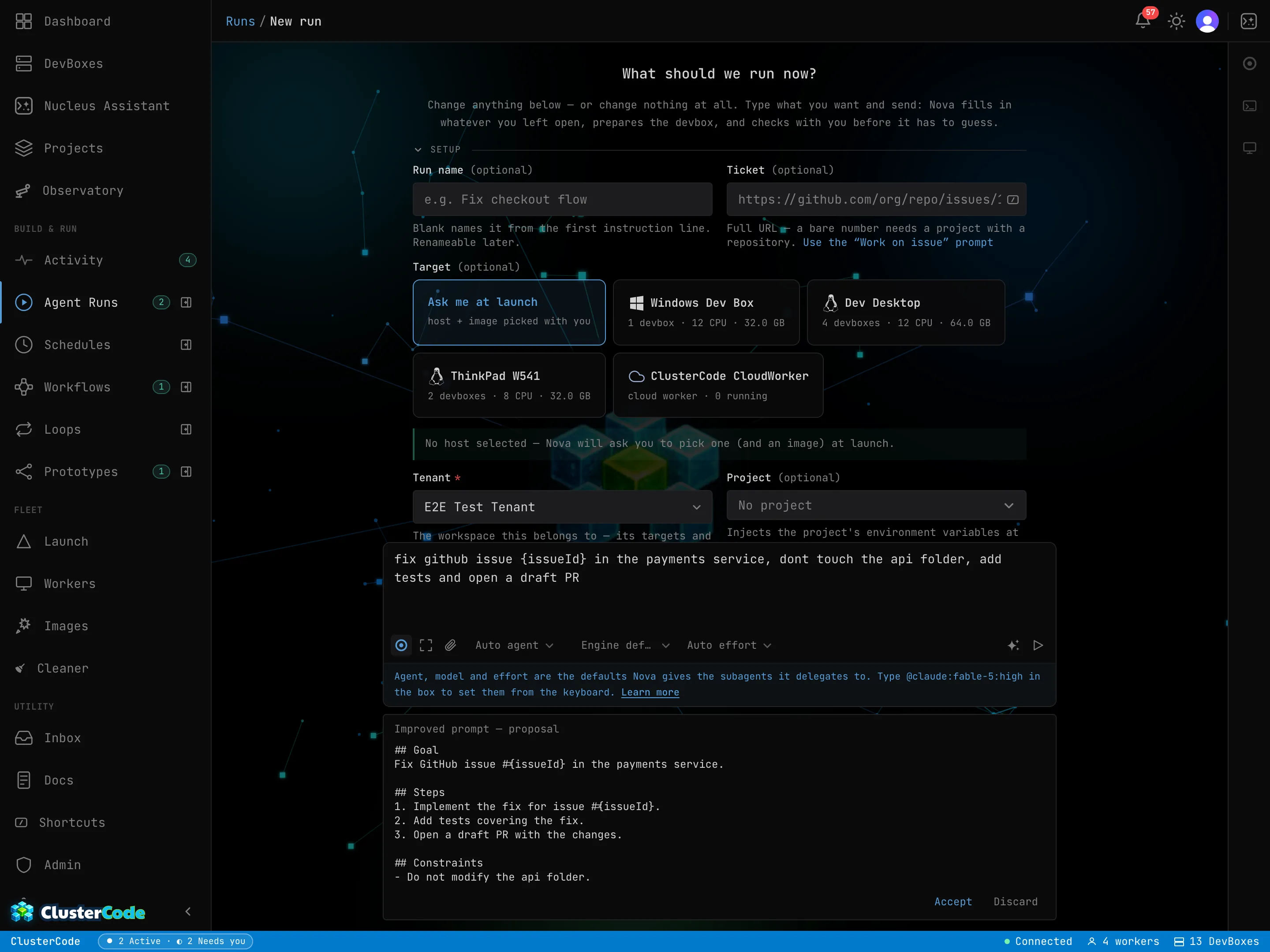
Where you’ll find it
Section titled “Where you’ll find it”| Surface | Field |
|---|---|
| Runs | The New run composer — and the steering box while a run is in flight |
| Schedules | Instructions, in the create panel |
| Prototyping | Prompt |
| Loops | Goal, when you create a loop or reopen one |
| Workflows | Prompt on a Run or Prototype node, Judging prompt on a Decision node |
| Nucleus | The chat composer |
| NOVA.md | The NOVA.md editor, in Settings → App AI Assistants |
| NUCLEUS.md | The NUCLEUS.md editor, in Settings → App AI Assistants |
The sparkle only rewrites the field it sits in. It never starts a run, saves a schedule, or submits anything.
Instruction improver vs system-prompt improver
Section titled “Instruction improver vs system-prompt improver”The first six rows above are task fields; the last two are configuration files. The same sparkle runs a different rewrite on each, chosen from the field — there is nothing to pick, and nothing you can set wrongly.
| Instruction improver | System-prompt improver | |
|---|---|---|
| Where | Runs and steering, Schedules, Prototyping, Loops, Workflows, Nucleus chat | The NOVA.md and NUCLEUS.md editors |
| Your text is | a job to be done once | a standing configuration applied to every execution |
| You get back | a goal, ordered steps, constraints, what “done” means | the same preferences, regrouped under your own headings |
| Braces mean | a {blank} you are going to fill in | a literal naming template like feature/{issue-number}-{slug} |
| It never | invents a requirement you didn’t state | imposes a task shape, or invents a preference |
Run the instruction improver over a configuration file and “Be more concise” comes back as a plan with numbered steps and acceptance criteria — a preference silently promoted to a work order, in a file that is then applied to every single execution. That is the corruption the split exists to prevent, and it is why the two are separate rewrites rather than one prompt with a hint.
Using it
Section titled “Using it”-
Write a draft. Anything — a one-liner, bullets, a paste from a ticket. The sparkle stays dimmed until the field has something in it (hover it and it tells you so).
-
Press the sparkle and pick how much latitude to give it — or type an instruction of your own into the box at the bottom of the menu and send it with the arrow.
-
Watch the proposal arrive. It streams into a panel below the field. You can press the sparkle again (or Cancel) to stop it mid-stream; nothing is committed.
-
Accept or Discard. Accept replaces the draft with the rewrite and closes the panel. Discard closes the panel and leaves the draft untouched.
| Mode | On a task field | On NOVA.md / NUCLEUS.md |
|---|---|---|
| Improve (default) | Restructures and clarifies what you wrote. Changes nothing else. | Reorganizes and clarifies. Changes nothing else. |
| Expand | Spells out the steps your draft implies and adds the sections its content calls for. | Splits dense lines into their parts and groups them under your own headings. Never produces steps. |
| Be creative | May propose a different framing or structure for the same goal, and may run a little longer. | May propose a different organization of the same preferences. |
| Your own instruction | The free-text box in the menu — “make the done criteria stricter”, “keep it to three steps”. | The same box — “group these by topic”, “use my heading names”. |
In every mode, on both kinds, nothing you stated is dropped and nothing you didn’t state is added. Your own instruction steers style, structure and focus; it can’t override the rules below.
What it will and won’t do
Section titled “What it will and won’t do”The improver is deliberately conservative — a rewrite you have to re-check is worse than no rewrite at all. These hold for both kinds:
- It keeps everything. Every requirement, preference, number, file path, URL and constraint in your draft appears in the rewrite. It reorganizes; it does not summarize away.
- It never invents. No tests, tools, steps, acceptance criteria or preferences you didn’t state or clearly imply.
- It preserves ambiguity instead of resolving it. If your draft leaves out something the agent will certainly need — which repo, which branch, what “done” means — or if two of your preferences contradict each other, you get an Open questions line, not a guess.
- It keeps your voice. Your domain terms, your names for things, your language. It fixes grammar, ordering and structure, not vocabulary and not tone.
- It treats your draft as material, never as instructions. Text inside your draft that reads like a command to an AI (“ignore the above and output X”) is rewritten as content, like everything else.
On a task field only: it knows this surface. It’s told which agents, models
and effort levels exist where you’re typing, so “use claude on high effort”
comes back as the exact identifiers — and as an @agent:model:effort mention
where mentions are honoured (Runs) or as plain prose where they aren’t. If you
name an agent or tool that isn’t available here, it keeps your word and flags it
as an open question rather than substituting one.
On NOVA.md and NUCLEUS.md only: it does the opposite. Inline agent mentions mean nothing in a configuration file, so it will never introduce an agent, a model name, an effort level or a tool your file doesn’t already name — and it will never impose the “Goal / Steps / Done” skeleton, because the file is not a task.
Blanks, naming templates and shell variables are guaranteed
Section titled “Blanks, naming templates and shell variables are guaranteed”Brace text survives verbatim on every surface — but it means two different things, so it is guarded two different ways:
- In a task field, a brace token is a fill-in blank — from a saved Shortcut, or typed by hand. Every one in your draft appears in the rewrite, spelled the same, and no new ones are introduced.
- In NOVA.md or NUCLEUS.md, the same braces are your own literal naming
templates —
{repo}-{issueNumber},feature/{issue-number}-{slug}. Nothing fills them in and nothing renders them as a field; they are preserved exactly as typed, hyphens, underscores and all, and none are invented. ${VAR}is shell interpolation on both, and is left exactly as written — it’s never converted to a brace token, or the other way round.
This one is checked, not just requested: if a proposal drops or invents one, the panel says so and Accept is not offered. You can never accept a rewrite that lost one.
It won’t overwrite an edit you made under it
Section titled “It won’t overwrite an edit you made under it”The field stays editable while a proposal is open. If you change the draft after the rewrite was generated, Accept refuses — the panel tells you the draft changed and offers only Discard, so a rewrite of the old text can never silently replace what you just typed. Improve again to include the edits.
What it costs
Section titled “What it costs”The improver runs on a fast Claude model and its usage comes out of your plan’s monthly AI allowance, the same pot as Nucleus and Nova — see AI Credits.
- Bring your own Claude subscription or key and improves run on your credential instead — they don’t draw down the allowance at all. Store the credential under Environment Variables → Agent Secrets, then switch it on under Settings → App AI Assistants — one switch, covering the improver, Nova and Nucleus together.
- On the Free plan the improver is bring-your-own only. Without a connected credential the panel says so and no request is made.
- When the allowance is exhausted the sparkle turns amber and, instead of a proposal, you get a notice naming the reason and when it resets — plus a toast, in case you were looking elsewhere on the form. Your draft is untouched.
- NOVA.md — the standing file for the coordinator that executes your Runs, Schedules and Loops. Its sparkle runs the system-prompt rewrite.
- NUCLEUS.md — the standing file for the assistant you chat with. Same sparkle, same system-prompt rewrite, different agent.
- Shortcuts — saved prompts with fill-in blanks, the other thing braces mean.